Gas Hob displays F
Issue
- One or more burners do not ignite
- F appears in one or more of the displays of the gas hob
- F comes on
Resolution
Here is the process to reset burners if an F appears in the display -
Power OFF using this button

Power ON using the same button
When hob display is illuminated, and F reappears touch the PAUSE button

WITHIN 3 SECONDS, then touch the Hob2Hood button

When a 0 is seen in the display

The fault is reset, and you can now light the burners correctly
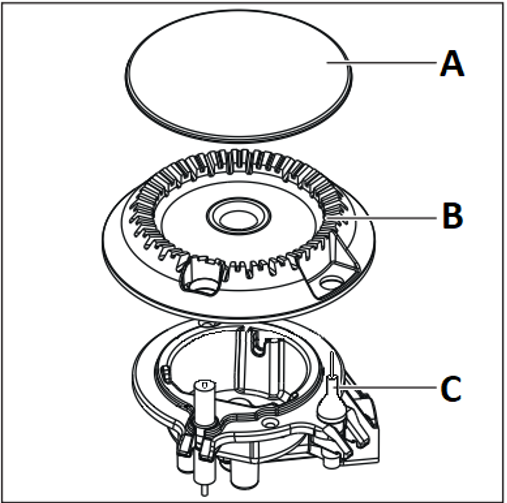
IMPORTANT: If there is still an issue please check that the Burner Cap (A) Burner Crown (B) are correctly fitted and the metal part of the Flame Safety Device (C) is clean (Use a moist soft cloth or sponge only)
If this does not resolve the issue, then call AEG Service 03445 611611
Was this article helpful?
Related Articles
- Hot plate switches itself off / beeps
- How do I connect my electric ceramic or induction hob to the power supply?
- How to use the SenseBoil® function on your AEG induction hob
- How to turn off DEMO mode in Electronic gas hob?
- Hob displays error message E4 / E401 / E402 / E403 / E421 / E422 / E423 / E431 / E432 / E433
- Gas hob displays error message E6
- Damage to ceramic and induction hob glass - Impact damage and stress damage (cracked glass)
- Induction hob displays error code F or F1
- Hob displays error message E9
- Dropped something on hob / impact damage / cracked glass / care / replace and how to organise a repair