How to use the ovens' camera?
Resolution
Question:
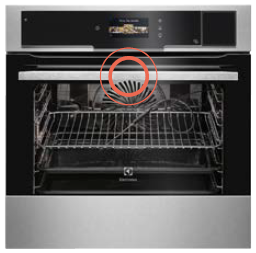
- How to use the CookView® Camera?
Applies to:
- CombiSteam Pro Smart connected oven
Answer:

Info:
- The camera is integrated in your ovens door handle.
Was this article helpful?
Related Articles
- Electric grill - open door grilling
- Grill pan handle requests
- How to use the Steam Cleaning function on your AEG steam oven
- How to set a cooker timer (duration) / minute minder
- How to Set the Oven Clock
- Oven clock flashes or displays "0:00" - AEG
- Oven displays SAFE or padlock symbol
- Oven display shows PYR
- Oven light does not work
- How To Remove Oven Shelf Supports For Cleaning
Related Articles
- Electric grill - open door grilling
- Grill pan handle requests
- How to use the Steam Cleaning function on your AEG steam oven
- How to set a cooker timer (duration) / minute minder
- How to Set the Oven Clock
- Oven clock flashes or displays "0:00" - AEG
- Oven displays SAFE or padlock symbol
- Oven display shows PYR
- Oven light does not work
- How To Remove Oven Shelf Supports For Cleaning