How to set a cooker timer (duration) / minute minder
Issue
- How to set a cooker timer (duration) / minute minder
Applies to:
- Freestanding cookers
Resolution
Setting the oven minute minder and duration (timer)
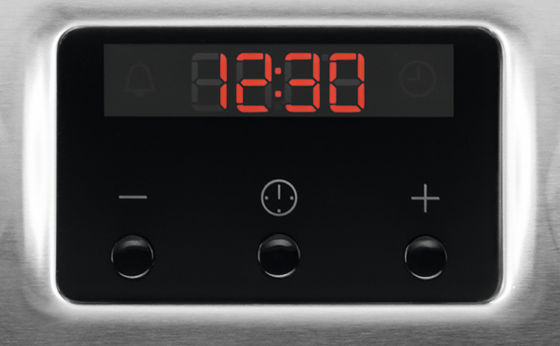
Setting the Minute Minder


3. The Minute Minder starts automatically after 5 seconds.
4. When the set time ends, an acoustic signal sounds. Press any button to stop the acoustic signal.
Settings the Duration*
*availability of this function depends on the model. Check your for more information
1. Set the oven function and temperature


5. Press any button to end the acoustic signal.
6. Turn the knob for the oven functions and the knob for the temperature to the off position
Cancelling the clock functions


If you found the following information helpful, please give us a thumbs up below. If this information did not resolve your question, all constructive feedback is welcome.
Was this article helpful?
Related Articles
- Oven displays SAFE or padlock symbol
- Oven displays error message E0020
- How to bake restaurant-quality pizza with AEG's PizzaExpert function
- How to clean your AEG oven and PizzaExpert accessories
- Electric grill - open door grilling
- Grill pan handle requests
- How to use the Steam Cleaning function on your AEG steam oven
- How to Set the Oven Clock
- Oven clock flashes or displays "0:00" - AEG
- Oven display shows PYR
Related Articles
- Oven displays SAFE or padlock symbol
- Oven displays error message E0020
- How to bake restaurant-quality pizza with AEG's PizzaExpert function
- How to clean your AEG oven and PizzaExpert accessories
- Electric grill - open door grilling
- Grill pan handle requests
- How to use the Steam Cleaning function on your AEG steam oven
- How to Set the Oven Clock
- Oven clock flashes or displays "0:00" - AEG
- Oven display shows PYR