How to deactivate AirDry on my dishwasher
Resolution
What Is AirDry Technology?
AirDry is an advanced drying feature in dishwashers designed to improve drying results by using natural airflow instead of relying solely on heat.
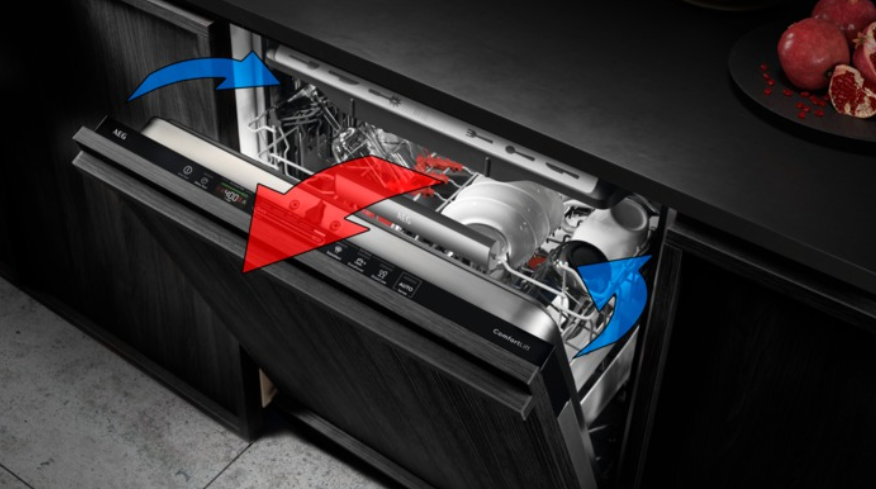
How the AirDry Function Works
During the final stage of the wash cycle, the AirDry system automatically opens the dishwasher door slightly. This allows fresh air to circulate inside the appliance.
The airflow helps remove moisture from dishes, improving drying performance compared with traditional closed-door systems.
As a result:
- Dishes come out dry and streak-free
- Drying performance is up to three times better compared with closed systems
Why Does the Dishwasher Door Open Automatically?
The automatic door opening is a normal part of the AirDry process. It occurs at the end of the drying phase to release humid air and allow cooler air to circulate inside the dishwasher.
When this happens:
- The display continues to show the remaining programme time
- The door stays slightly open until the cycle is complete
Is AirDry Safe for Kitchen Worktops?
Yes, AirDry technology is safe for kitchen worktops.
The door opens in a controlled manner to prevent heat or moisture from affecting surrounding surfaces. The system has been designed to operate safely with standard kitchen installations.
When Does AirDry Activate?
- AirDry is automatically activated on all compatible programmes
- No manual action is required
- The duration of the drying phase and door opening depends on:
- Selected programme
- Additional options
Consult your dishwasher user manual for more information.
How do I disable AirDry on my dishwasher?
To deactivate the AirDry function, follow the step-by-step instructions below.
Note: The method may vary depending on the type of dishwasher control panel. Consult your dishwasher user manual for details specific to your model.
The procedure for disabling the AirDry function is described in the “Basic Settings” section.
Dishwashers with QuickSelect controls*

If the control panel looks like the picture above, proceed as follows:
1. Enter basic settings mode.
You can enter settings mode before starting a programme. You cannot enter settings mode while the programme is running.
Press and hold ECO and AUTO simultaneously for about 3 seconds. The display shows the first setting: HAr.
2. Use My Time selection bar to navigate in settings mode.
Three LEDs on the MY TIME bar will light up.
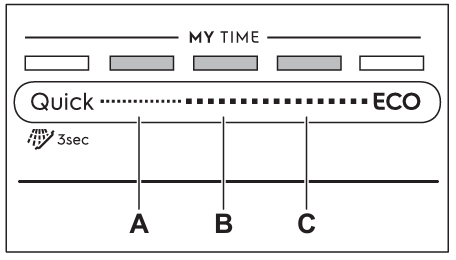
A - button Back
B - OK (Confirm) button
C - button Next
3. Select the Auto Door Opening (Ado) setting. It’s usually in the 4th position.
Keep pressing the Next button until “Ado” appears on the screen.
4. Change the function status
Press OK to change the function setting
- ON – AirDry function enabled
- OFF – AirDry function disabled
Use the Next or Back button to select the appropriate option, then confirm it by pressing OK.
5. Save the settings
Press Quick and ECO again for about 3 seconds, until the dishwasher returns to programme selection mode.
The saved settings remain valid until you change them again.
*Note: The images shown are for reference only and may represent a different or earlier user‑interface version. Button layout, programme names, symbols, or indicators may vary depending on the appliance model. Always refer to your user manual for information specific to your appliance.
Was this article helpful?
Related Articles
- Dishwasher displays error message i40, i43 or i44
- Dishwasher displays error code i20 beeps 2 times or LED flashes 2 times
- Dishwasher is stuck mid-cycle and won't allow me to select a different programme
- Dishwasher short-circuits, burns out fuses or trips RCD circuit breakers
- The dishwasher displays error code i60 or i69
- Dishwasher displays error message iF0, iFo or iF1
- Symbols & programmes on your AEG dishwasher
- Dishwasher is making unusual noises
- Rust spots on cutlery after washing in the dishwasher
- Dishwasher does not / will not start but the power is on
Spare parts & Accessories
Find original spare parts for your appliance in our webshop and have them delivered directly to your door.
Related Articles
- Dishwasher displays error message i40, i43 or i44
- Dishwasher displays error code i20 beeps 2 times or LED flashes 2 times
- Dishwasher is stuck mid-cycle and won't allow me to select a different programme
- Dishwasher short-circuits, burns out fuses or trips RCD circuit breakers
- The dishwasher displays error code i60 or i69
- Dishwasher displays error message iF0, iFo or iF1
- Symbols & programmes on your AEG dishwasher
- Dishwasher is making unusual noises
- Rust spots on cutlery after washing in the dishwasher
- Dishwasher does not / will not start but the power is on